Smart door locks have become a cornerstone of modern smart home security, letting you ditch physical keys in favor of keyless entry through codes, fingerprints, or your phone. They solve real problems like fumbling for keys while carrying groceries, giving temporary access to guests or service workers, and knowing exactly who comes and goes from your home. Many also integrate with existing smart home systems, which means you can unlock your door with a voice command or automate it to lock when you leave.
The type of connectivity and unlock method you choose will shape your daily experience more than anything else. Wi-Fi models let you control your lock from anywhere and check status remotely, while Bluetooth versions work locally and often have longer battery life. Fingerprint readers offer quick access but can struggle with wet or dirty fingers, and keypads are reliable but require you to remember codes. Some locks combine multiple methods, giving you flexibility depending on the situation.
I’ve used a range of smart locks across different connectivity types and entry methods, and the models below stand out for balancing security, convenience, and reliability in real-world use.
Best Smart Door Locks
Below is my full list of the best smart door locks I recommend for different homes and budgets. These models actually deliver on security, convenience, and reliable smartphone integration without the usual headaches.
eufy Security Smart Lock C220

The eufy Security Smart Lock C220 is a solid pick if you want reliable fingerprint access and built-in Wi-Fi without paying premium-brand prices.
Pros
Fingerprint scanner improves accuracy over time and unlocks in under two seconds
Built-in Wi-Fi means no hub or extra hardware
Eight-month battery life with standard AA batteries
Cons
Aluminum body feels less premium than steel
App notifications occasionally lag
Fingerprint sensor prefers clean, dry fingers
I installed this lock on my front door in about 20 minutes with no drilling. The fingerprint recognition noticeably improved after the first week and now unlocks almost instantly. I mostly use the fingerprint and the app, but it supports several entry methods.
Remote access has been dependable when letting someone in while I’m away. Battery life is also better than expected—after two months mine still reads around 75%. The keypad is bright at night, temporary codes are easy to create, and Alexa integration works well for lock status checks.
Philips Wi-Fi Smart Lock with Handle

Great if you want a matched deadbolt + handle combo with fast fingerprint unlocking—though it does require the included gateway for remote control.
Pros
Fingerprint unlocks in a third of a second
Bundled handle gives a clean, unified look
Multiple code types for temporary or recurring access
Cons
Requires the included gateway for Wi-Fi
Install may take longer on older doors
Notifications lag a few seconds
The bundled handle is a nice touch and looks sharp once installed. Fingerprint reliability is excellent—even with slightly damp hands. Once I paired the gateway, remote access worked consistently. Auto-lock became one of my favourite features after setting it to 60 seconds.
Battery life has held up well, and installation took me around 45 minutes due to one extra pilot hole I had to drill.
LOCKSTAR Smart Door Lock
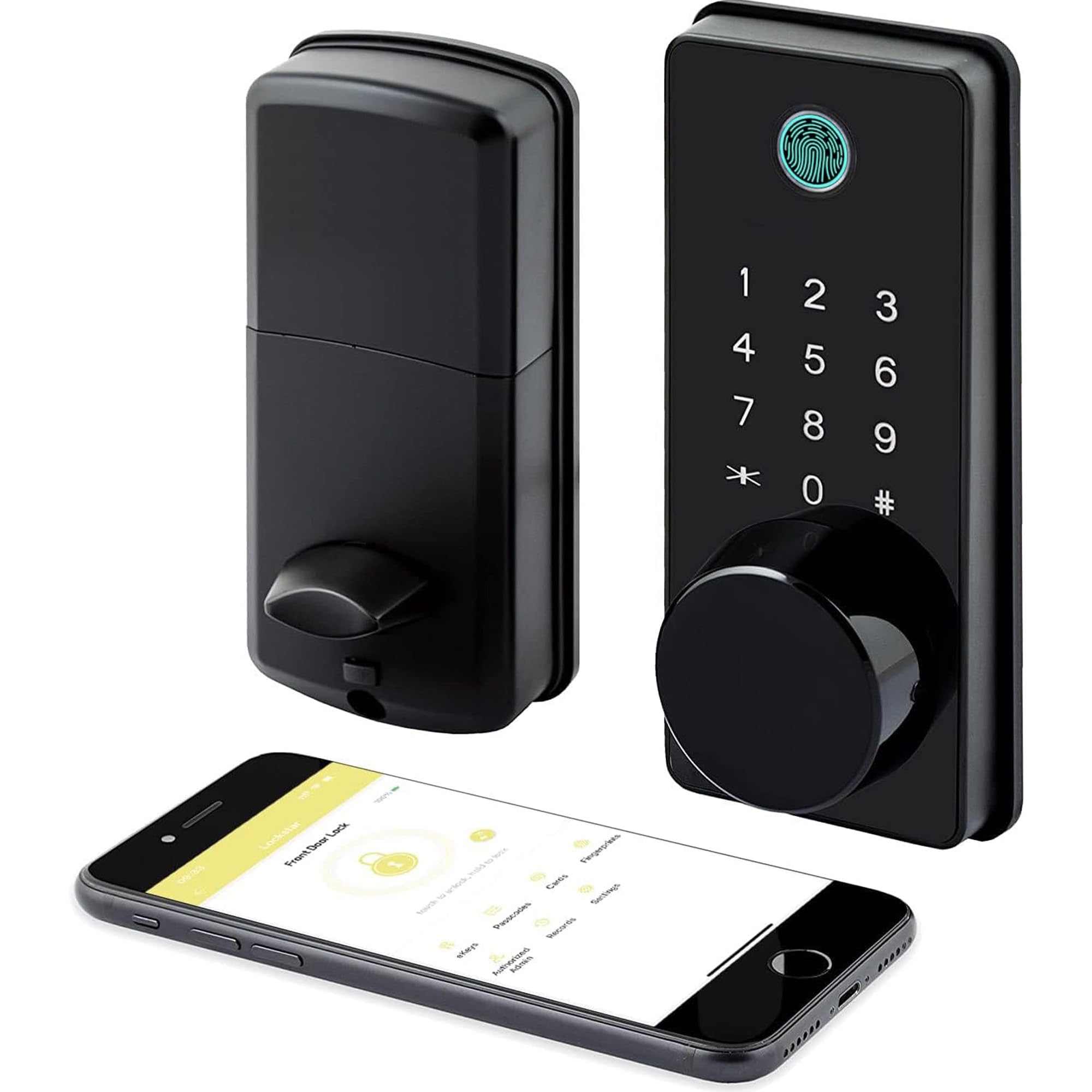
A budget-friendly option with genuine offline fingerprint unlock and a reliable auto-lock feature.
Pros
Fingerprint works fully offline
Auto-lock triggers reliably
Wi-Fi gateway included in the box
Cons
App can take time to connect remotely
Touch keypad sometimes needs a second tap
Adding multiple users slows down initial setup
Fingerprint unlock works even in damp conditions, and the lock logs every access method clearly. Installation was straightforward, and the included gateway makes remote access setup simple. The only annoyance is occasional 15–20 second delays connecting to the lock from outside the home.
Schlage Encode WiFi Deadbolt

A dependable, direct-to-Wi-Fi lock that doesn’t require any hubs and prioritizes security.
Pros
Direct Wi-Fi—no bridge needed
Handles up to 100 access codes
Built-in alarm detects tampering
Cons
Touchscreen wakes slowly in cold weather
Faster battery drain with heavy use
Notifications can lag occasionally
Setup took under 20 minutes thanks to Schlage’s Snap ’n Stay design. Auto-lock is incredibly convenient, the touchscreen is responsive, and Alexa commands work reliably. I typically get around four months of battery life, and the app alerts me well before they die.
Yale Assure Lock 2

Fast installation, built-in Wi-Fi, and reliable auto-unlock—just note it’s North America only.
Pros
Installs in ~10 minutes
Built-in Wi-Fi (no hub needed)
Auto-unlock works well with tuned geofencing
Cons
North America–only activation
DoorSense adds one more install step
App takes some getting used to
I had this mounted and working in under 15 minutes. Auto-unlock works roughly 80% of the time once dialed in, which is surprisingly handy when loaded with packages. Remote access is rock solid, and the keypad responds instantly. The only real limitation is regional activation—this is strictly US/Canada.
Kwikset Halo Touchscreen

Convenient direct Wi-Fi connectivity, but reliability varies depending on the unit you get.
Pros
Direct Wi-Fi with no hub
Supports 250 user codes
Easy installation
Cons
App can be unreliable after battery swaps
Occasional pairing loops
Performance varies between units
The Halo is great in theory—direct Wi-Fi, quick installation, flexible code management. In practice, app stability can be hit or miss. After my first battery change, I had to re-pair it several times. When it works, it works well; when it doesn’t, it’s … character-building. Security alerts and guest-code management, however, are top-notch.
Buying Guide
When we started shopping for smart locks, we quickly realized there’s no one-size-fits-all option. The right choice depends on your home setup, tech preferences, and how much control you want over access.
Connectivity Type
Wi-Fi smart locks connect directly to your router, letting you control the lock from anywhere and receive real-time notifications. They drain batteries faster but offer the most flexibility.
Bluetooth smart locks only work when you’re nearby, typically within 30-40 feet. They’re more energy-efficient and often cheaper, but you’ll need to be close to unlock or check status.
Installation Style
You’ll choose between two main approaches. A retrofit smart lock attaches to your existing deadbolt, keeping your current keys and exterior hardware intact. Installation takes minutes, but compatibility varies by deadbolt type.
A deadbolt replacement swaps out everything, giving you a cleaner look and more features. Expect 30-60 minutes of installation with a screwdriver.
Key Features to Consider
| Feature | What to Look For |
|---|---|
| Power Source | Most use AA batteries lasting 6-12 months; some offer backup options |
| Access Methods | Mix of keypad, fingerprint, app, physical key, or voice control |
| Smart Home Integration | Check compatibility with Alexa, Google Home, or Apple HomeKit |
| Security Standards | Look for ANSI/BHMA Grade 2 or higher ratings |
| Auto-Lock | Automatically secures door after set time period |
We recommend prioritizing locks with multiple unlock methods in case your phone dies or you forget codes. Battery alerts are essential too.
Frequently Asked Questions
What features matter most in a smart lock?
Auto-lock, auto-unlock, reliable remote access, temporary codes, and solid battery alerts. These solve the everyday pain points—especially when you’re carrying bags or letting guests in remotely.
How secure are Wi-Fi smart locks?
Wi-Fi models offer the most features but have the biggest attack surface. Good brands use strong encryption (AES 128/256) and consistent security updates. Bluetooth and keypad-only models reduce digital exposure but limit convenience. Physical door security still matters more than connection type.
Can beginners install these themselves?
Most smart locks install in 15–30 minutes using only a screwdriver. If your door already has a standard deadbolt hole, you’re simply swapping hardware. Older or metal doors may require reinforcement or minor drilling.