Meeting notes are easy to ignore until you need them three days later and realize the decision was never written down. Plaud NotePin S is a wearable AI recorder built to solve that problem: clip it on, record hands-free, and get transcripts and summaries in the Plaud app, web, or desktop afterward. I spent time with it to see whether it delivers on that promise or just adds another subscription to the stack.
Click the image to check the current price and availability: 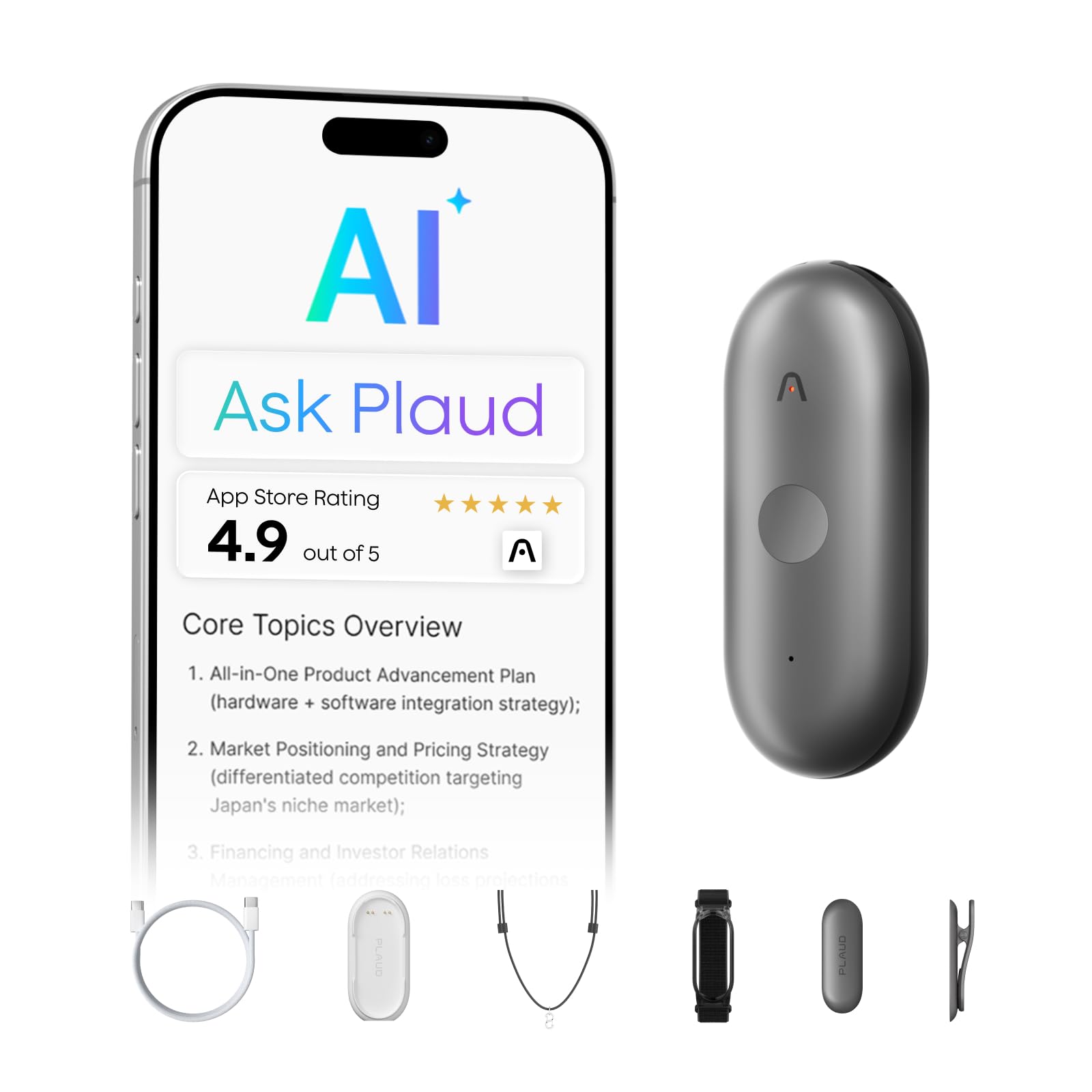
Why I Bought It
I needed a hands-off way to capture meeting notes and interviews without staring at my laptop. I’d tried phone recordings and manual notes, but they felt clunky and distracted me from conversations.
The NotePin appealed because it promised wearable, automatic transcriptions and summaries—so I could stay present and still get searchable text. After using it, I liked that it actually captured clear audio and made follow-up easier, though the subscription cost was an annoyance.
How the Plaud NotePin S Changes My Workflow
I stopped juggling voice memos, typed notes, and half-remembered action items. Wearing the NotePin S let me capture meetings hands-free and jump back to highlighted moments instead of scrubbing audio for ten minutes.
The wearable form (I used the clip and lanyard most) made it easy to record without looking like I was setting up gear. Transcripts and quick summaries showed up in the app fast enough to turn meeting audio into task lists I could actually act on.
Battery life lasted through a long day of interviews, so I didn’t have to babysit charging. The subscription for heavier transcription stings if you record constantly. So you need to expect an ongoing cost if this becomes your primary note source.
Overall, it reduced context-switching and let me stay present in conversations while still getting searchable, summary-ready notes afterward.
Key Features
I wore the NotePin S for a week to see if it actually made meeting notes less chaotic. The features that stand out feel built for someone who wants to record and recall without fuss — but a few trade-offs matter.
Wearable Design and Accessories
The Plaud NotePin S is tiny and light; I clipped it to a lanyard and wore it as a necklace during interviews. The included clip, magnetic pin, wristband, and lanyard let me switch styles quickly depending on formality and comfort — making it one of the more versatile wearable voice recorders I’ve tried.
Real downside: the magnet can be awkward around clothes and the warning about chest placement makes the lanyard less versatile for some users.
AI Transcription and Summaries
Transcripts arrive via the Plaud app and web, and the AI transcription engine does a solid job of turning speech into readable notes. I found the role-focused summaries helpful when I wanted action items or a quick brief after a long meeting — the kind of AI meeting notes that actually save time rather than add editing work.
Automatic templates and summary formats speed up follow-up, though heavy users may hit the subscription limits sooner than expected.
Privacy and Data Storage
Local storage felt reassuring — I could record without a connection and still keep files on the device, which matters for anyone using a voice recorder for confidential interviews or sensitive business meetings. The product emphasizes enterprise-grade protections, which matters if you handle sensitive info in interviews or medical settings.
Be mindful: syncing to cloud services and AI processing may involve uploaded content, so check account settings if strict privacy is required.
Smart Highlights and Multimodal Input
The physical record button and touch highlights let me mark key moments in real time, which made later scanning much faster. I also used the app to add typed notes and photos tied to specific timestamps; the combined context made AI-generated summaries more useful and reduced the time I spent hunting through raw audio.
In practice, the highlight feature is a small workflow win — not revolutionary, but it saves time when reviewing long recordings.
Pros and Cons
Pros
- Lightweight and easy to wear — I clipped it to my shirt and barely noticed it during a long meeting. The small size makes it unobtrusive for daylong use.
- Reliable local recording — 64GB storage meant I didn’t worry about losing audio when Wi‑Fi flaked out. That gave me confidence for back‑to‑back interviews.
- Fast, usable transcripts — the app turned recorded sessions into readable notes that I could skim and convert into tasks. Templates helped me shape raw audio into practical outputs without extra work.
- Flexible wearing options — switching between clip, lanyard, wristband, and pin matched different situations (presentations vs. casual capture). The physical record button made it easy to mark important moments.
- Good battery life for whole‑day use — I got through long days of meetings without constantly hunting for a charger.
Cons
- Subscription nudges — the free starter minutes are helpful, but I found heavy transcribers will quickly need a paid plan to avoid limits. That adds ongoing cost.
- Occasional accessory confusion — the package lists multiple wear options; early on I misread what was included versus sold separately, which caused a minor annoyance.
- Privacy and etiquette overhead — you have to remember to tell people you’re recording; it’s practical but adds friction in casual settings.
- Not ideal for chest wear — magnetic parts mean I avoided wearing it on my chest (important if you use a lanyard), which limits placement for some outfits.
Who Should Actually Buy This
If you need to stay present in meetings but hate scribbling, this is for you. I used the NotePin S clipped to my lapel during interviews and it reliably captured clear audio without me fiddling.
Choose it if you want quick, searchable transcripts and role-focused summaries that save time turning talk into tasks. The wearable options made it easy to keep the device on during long days, though toggling the record button felt fiddly in some tight pockets.
Skip it if you won’t use frequent transcriptions — the free minutes are tiny compared with heavy meeting use, and the subscription adds up. Also avoid wearing it on the chest if you have a pacemaker.
Final Verdict
After using the NotePin S for a week, I found it surprisingly useful for staying present in meetings while still capturing everything I need. The AI summaries save time when I just want the key points, though the subscription cost can sting if you need advanced features long-term.
I liked how easy it was to wear and forget about until I needed a transcript or quick recap. Battery life and on-device storage let me record a full day without constant babysitting.
If you want a discreet, hands-off note taker that genuinely reduces post-meeting grunt work, this is worth considering. Skip it if you don’t plan to use AI summaries often or want a truly budget option.
Frequently Asked Questions
How easy is it to set up and use day-to-day?
Setup took me under 10 minutes: charge, pair with the Plaud app, and register. The physical record button makes starting and stopping simple during meetings, and the multiple wear accessories let me clip or wear it depending on the situation. Day-to-day use felt low-effort — battery life gave me a full workday of recording, and local 64GB storage meant I didn’t panic when Wi‑Fi was flaky.
Do I need a subscription, and what does it actually cost?
You get a free Starter Plan with 300 transcription minutes per month, which covers light users. I upgraded briefly to the Pro Plan when I had heavy meeting weeks; it costs about $8 month billed annually and raises monthly minutes to 1,200. If you need nonstop transcribing, the Unlimited Plan is roughly $240/year. Pay attention to your monthly minutes: the device records locally, but heavy transcription beyond the free minutes needs a plan.
How good are the transcripts for meetings and messy conversations?
Transcripts are generally accurate in quiet, one‑speaker settings — I used it for training sessions and interview notes and only edited small punctuation or speaker labels. In overlapping talk or crowded rooms, accuracy drops and you’ll need more manual cleanup; the app’s templates and highlight features help speed that up. Multilingual support impressed me when switching languages, though heavily accented or technical jargon still required corrections.
What’s the difference between the NotePin S and the regular Note?
The NotePin S felt lighter and more refined in my pocket, and the S claims improved AI summarization and template integration in the app. In practice, that meant faster, more structured summaries and easier generation of to‑do lists from meetings compared with older models I tried. Expect the same basic recording workflow, but the S focuses more on smarter post‑processing and smoother app-driven outputs rather than radically different hardware.