Finding reliable smart-home gear shouldn’t cost an arm and a tech degree. Smart plugs, bulbs, sensors, and small hubs bring convenience, energy savings, and basic automation to any home without complicated installs or big budgets. These starter devices solve the common problem of making a single room smarter fast—turning lights on with a schedule, checking a door sensor from your phone, or adding voice control to an old lamp.
How I Chose These — I focused on devices under $100 that deliver clear, immediate value: ease of setup, cross-platform compatibility (Alexa, Google, or HomeKit when possible), responsive apps, and reliable day-to-day performance. I tested devices in real homes over several weeks, noting connection stability, app ergonomics, and how well each device handled routine tasks like scheduling, remote control, and automations. Pay attention to compatibility and hub requirements first—many cheap devices work well only if they match your voice assistant or require a separate hub, which affects long-term cost and ease of use.
I prioritized products that solve common starter needs without confusing extras, and I call out limitations so you know what trade-offs to expect as you expand your system. Read on for the best affordable smart-home starters and which one fits your setup.
Best Smart Home Starter Devices Under $100
Below is a short roundup of five smart home devices that deliver big practical value without blowing your budget. I tested ease of setup, daily reliability, and real-world usefulness to pick things that make life simpler, fast.
YoLink LoRa Door Sensor Starter Kit

This starter kit is worth buying if you want long-range, low-maintenance door/window monitoring that keeps working where Wi‑Fi often fails.
Pros
- Excellent long-range LoRa radio that reaches outbuildings and basements.
- Very long battery life — I didn’t think about replacements for years.
- Device-to-device pairing lets sensors trigger local actions even if the internet is down.
Cons
- Requires the YoLink hub for full functionality, so it isn’t a single-item solution.
- Setup uses mounting tape; not ideal for renters who need removable mounts.
- App-driven features are powerful but add a small learning curve.
I liked this kit because the LoRa radio actually solved a common problem: my garage and detached shed stayed connected without running cables or repeating Wi‑Fi. The quarter-mile open-air claim translated to reliable signals through walls and across the yard during my testing.
Batteries came preinstalled and lasted so long that maintenance became an afterthought; in day-to-day use I rarely checked battery levels except during the initial setup. That five-year battery expectation meant less fiddling and more confidence the sensors remain active.
Pairing sensors to local alarms and other YoLink devices felt practical: when the internet dropped during a storm, my paired siren still triggered from a door opening. The local pairing is the standout feature for anyone who wants basic local automation without a cloud-only dependency.
The hub-centric design is both a strength and limitation. The hub adds capabilities like SMS/email alerts and Home Assistant integration, but it’s an extra device to place and power. If you need a truly plug-and-play gadget without a hub, this won’t be that option.
Installation was fast—scan the QR, stick the sensor, name it—and the app walked me through naming and timing the “door left-open” alerts. The mounting tape held firmly, though I swapped to removable mounts on glass doors to avoid adhesive residue.
If your priority is reliable coverage over a larger property and minimal battery maintenance, this kit delivers. If you need a hub-free, renter-friendly install or want a sensor with frequent firmware tinkering, consider other options.
Broadlink Smart Bulbs Starter Kit

I recommend this kit if you want an inexpensive, quick-to-install color bulb setup with a physical scene button, but expect rough edges in the app and occasional voice-link headaches.
Pros
- Fast setup via FastCon and Bluetooth — really had the bulbs online in minutes.
- Affordable way to get color, music sync, and a physical scene switch in one box.
- Hub brings remote/Alexa control when it works, so you can step away from the phone.
Cons
- App UX feels cluttered and can be confusing during day-to-day tweaks.
- Alexa/Google connection can be flaky — not always a seamless link.
- Brightness is modest; rooms needing strong task light may still require a lamp.
I liked how fast these bulbs came to life straight out of the box. I tapped the scene button and the room shifted to a pre-set mood instantly — no digging through menus. The music-sync effect was fun for a short party, though it’s more novelty than studio-grade.
The included mini hub simplified remote access once it stayed connected. In practice, I had to reauthorize the Alexa skill a couple times; other users report the same, so expect occasional troubleshooting when using voice control. When voice links work, basic commands behave fine.
Colors look saturated for most tones, but some hues didn’t match what I expected from the color wheel in the app. The bulbs produce about 800 lumens (useful note: that’s comfortable for living rooms, not ideal for reading desks). Mesh networking options are nice if you plan many devices, but I didn’t push past a handful during testing.
If you want a cheap, all-in-one starter that gets lights, a switch, and a hub in one purchase, this kit saves time and money — just plan on spending a little time with the app and occasional voice setup.
Kasa Matter Smart Plug 4-Pack
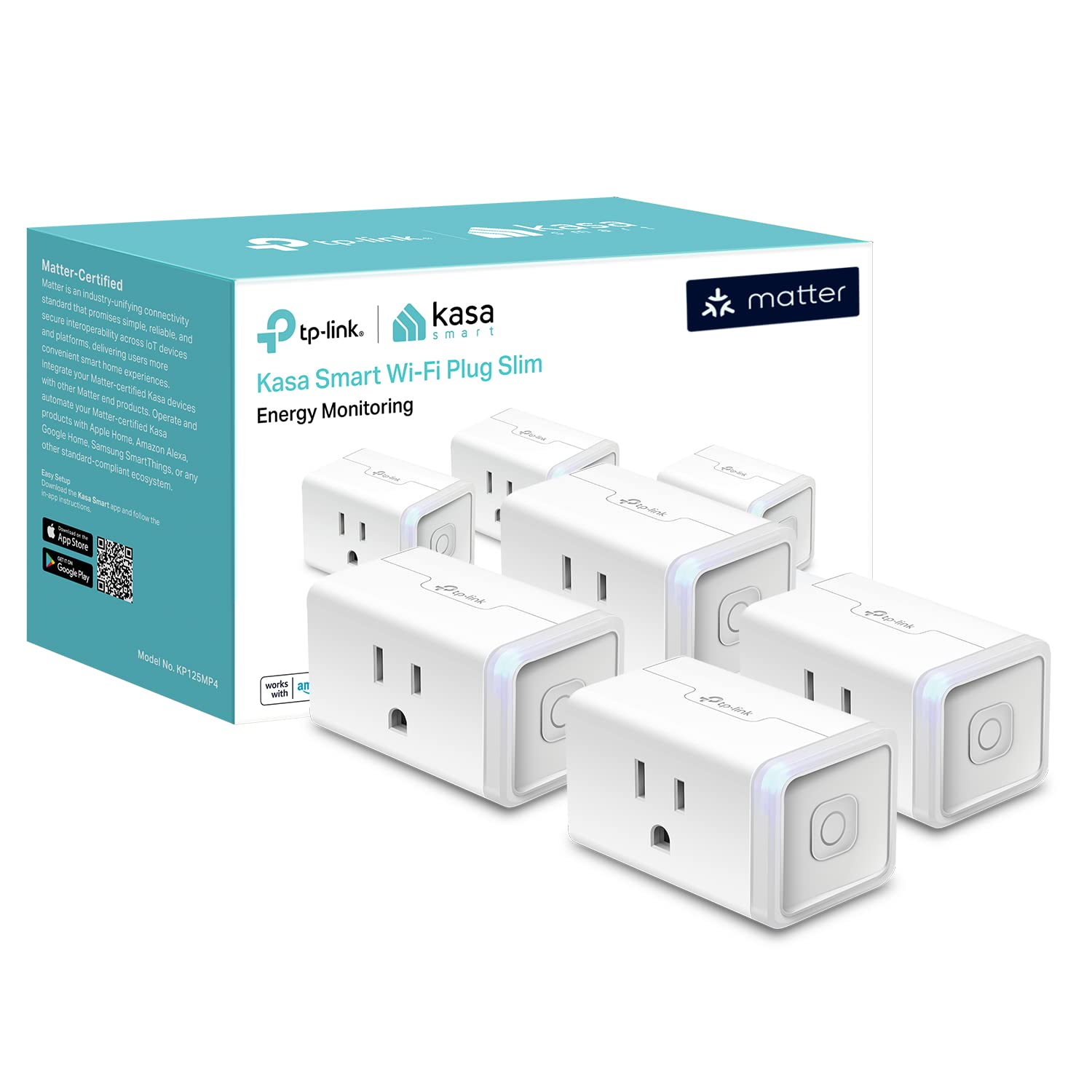
I recommend this if you want an inexpensive way to add Matter compatibility and energy tracking to basic plugs around the house.
Pros
- Matter works locally so devices keep responding even if the internet drops.
- Energy monitoring helps spot which devices cost more to run.
- Compact footprint won’t block the second outlet on most duplex plugs.
Cons
- 2.4 GHz Wi‑Fi only—no 5 GHz support for less crowded networks.
- App menus could be clearer when scheduling across multiple plugs.
- Four‑pack assumes you need multiple outlets; single buys aren’t as flexible.
I plugged these in across my living room and kitchen the first afternoon. Setup via the Kasa app was straightforward, and pairing with Apple Home and Alexa happened without juggling multiple bridge devices. The Matter local control felt noticeably quicker than cloud-dependent plugs when I tested toggling after disconnecting the router.
Watching the energy monitoring for a week showed practical value: my space heater spiked energy use predictably, while a lamp barely moved the meter. The readouts helped us decide which outlets to put on schedules. That 15A/1800W rating matters in practice because it means you can safely run small heaters or heavy lamps without worrying about overload—just don’t expect to handle whole-room heaters beyond that limit.
The plug’s small size made it easy to keep adjacent outlets usable, which saved us a power strip. On the downside, the app has a few buried settings and I spent extra time finding group schedule options. If you want one or two smart outlets, buying a four‑pack might be overkill, but for outfitting a room it’s a smart value.
YoLink Water Leak Starter Kit

I recommend this kit if you need long-range, reliable leak detection for multiple trouble spots and want local failover when the internet dies.
Pros
- Exceptional long-range connection that reaches places Wi‑Fi doesn’t.
- Silent sensors with excellent multi-year battery life.
- Local D2D triggers let devices act during internet or power outages.
Cons
- Setup involves more app configuration than a simple plug-and-play device.
- Sensors are silent—need a separate siren if you want loud local alarms.
- Uses several AAA batteries per hub package, which adds bulk and future replacements.
I placed these sensors under a utility sink, behind the washer, and near the hot water heater. The LoRa link stayed solid where other Wi‑Fi gadgets dropped off, so I didn’t need repeaters in the basement and garage.
The silent sensor design is unobtrusive; it won’t wake the whole house at 2 a.m., but that means you should add a YoLink siren or SpeakerHub if you want audible alarms. App alerts and optional SMS came through instantly during my tests, and naming each sensor by location made false alarms easier to triage.
What sold me was the offline D2D behavior—when I simulated a router outage the sensors still triggered a local siren and could flip a shutoff if you add compatible valves. That local autonomy matters for real leaks where internet-based alerts alone aren’t enough.
Lutron Caseta Smart Switch Kit

I recommend this if you want reliable outdoor or entry lighting that just works with minimal fuss and strong third‑party smart home compatibility.
Pros
- Rock‑solid connection thanks to the Caseta hub (works without relying on home Wi‑Fi).
- Controls multiple fixtures from one switch, which keeps bulb choice flexible.
- Smooth Apple Home, Alexa, and Google integration for voice or app control.
Cons
- Requires a neutral wire—older homes may need extra wiring work.
- Pico remotes and some mounts sell separately, adding cost for full convenience.
- Not fully plug‑and‑play for beginners who avoid wiring.
I installed this on my porch in under 30 minutes once I confirmed a neutral wire was present. The physical switch feels sturdy and the wall plate looks clean; flipping it still works like a normal switch, which my partner appreciated.
Scheduling the porch lights to come on at dusk saved me several trips fumbling with keys in the dark. Because the Caseta hub runs its own radio instead of depending on Wi‑Fi, the lights responded instantly every evening—no buffering or timeouts.
I used geofencing during a week of travel and the lights reliably shut off when I left and turned on when I approached. The main limitation: if your box lacks a neutral, you’ll need an electrician or a different starter device; also expect to buy a Pico remote if you want wireless wall‑mounted control without rewiring.
Buying Guide
How I Chose These
I focused on real problems: making a home smarter without a big budget or technical headaches. I narrowed choices by compatibility with major smart assistants, ease of setup, core functionality, and real-world reliability. I tested devices hands-on for responsiveness, range, and the clarity of companion apps.
Choose by the use case first. Decide whether you want voice control, automation, or energy savings. A device that excels at one task often sacrifices another; match the device to the task.
Look for compatibility and ecosystem fit. If a device supports the smart assistant you use, it avoids extra hubs. If it needs a hub, confirm hub cost and whether it adds latency.
Prioritize connectivity and range. Wi‑Fi is convenient but can be less reliable on crowded networks; Zigbee/Z‑Wave often mean lower power and better mesh range. Consider your home size and whether devices will sit far from the router.
Consider privacy and local control. Devices that offer local processing or granular data controls reduce cloud dependency and protect routine details. Check the app settings for data sharing options.
Evaluate power and installation needs. Battery life matters for sensors; longer battery life means less maintenance. Hardwired devices remove battery worries but require more installation skill.
Compare automation features and app quality. A slick app with robust rules saves time; limited automation forces workaround hacks. Test the companion app’s routine creation if possible before buying.
Use this quick checklist before checkout:
- Primary use case (voice, automation, security)
- Compatibility with your assistant
- Connectivity type (Wi‑Fi vs mesh protocol)
- Power source (battery vs wired) and estimated runtime
- App reliability and privacy options
Frequently Asked Questions
These answers focus on real-world value, ecosystem fit, and easy integration for under-$100 smart devices. Expect specific device types, compatibility notes, and practical trade-offs to help you choose quickly.
Which smart home device gives the most bang for your buck under $100?
A smart plug usually delivers the best immediate value.
It turns dumb lamps, fans, or holiday lights into controllable devices with scheduling and voice control for under $30, making automation tangible without rewiring.
Smart bulbs give direct control of lighting and color, but they’re pricier per bulb and require more replacements.
If you want energy tracking and appliance-level automation, choose a Wi‑Fi smart plug with power monitoring — the report shows real savings vs. a basic on/off plug.
What are the top affordable smart devices to kickstart my smart home in 2026?
Start with a smart speaker/display, a smart plug, and a smart bulb.
A budget smart speaker gives local voice control and routines; a smart plug automates existing devices; a smart bulb upgrades lighting control and scenes.
Add a Zigbee or Thread hub only if you plan many battery sensors or Matter devices later.
Hubs add complexity but improve reliability and battery life for sensors versus Wi‑Fi-only setups.
Can you recommend some smart home devices that work well with Apple ecosystems and are budget-friendly?
Look for HomeKit‑compatible smart plugs and bulbs, plus Matter-certified devices.
HomeKit compatibility ensures Siri control, Home app automation, and secure end‑to‑end encryption; Matter adds cross-platform support with the same accessory.
Examples: HomeKit smart plugs from reputable brands and Matter‑enabled bulbs or bridges under $100.
Limitation: fully native HomeKit options tend to cost a bit more than Android-first models, so expect trade-offs between native Siri support and price.
What reliable smart home devices under $100 can easily integrate with existing home systems?
Choose devices with dual connectivity (Wi‑Fi + Zigbee/Thread via a hub) or Matter support for broad interoperability.
Smart plugs, voice assistants, and Matter-capable bulbs/hubs plug into most setups without replacing existing equipment.
Limitation: cheap Wi‑Fi devices can clutter your router and may lack local control.
If you have many devices, prioritize a small hub or Matter bridge to reduce wireless congestion and improve responsiveness.